Matador Is Not a Dealership CRM.
It Integrates With Yours.
Matador.ai is AI software that works inside the CRM your dealership already has. It connects through 62 integrations or a browser extension, answers every new lead in 30 seconds, holds the conversation, books the appointment and keeps following up for 180 days. We built this guide to help you choose a CRM on its merits, whichever one you pick.
Five AI agents do the work:
AI Engage Opens every new lead in 30 seconds with a message built from its source and intent.
AI Reply Your AI BDC: holds the conversation on live inventory, day or night, and books the appointment.
AI Follow-Up Works stalled leads for 180 days, with a real reason to come back.
Call AI Answers every call: receptionist, sales line and service scheduler. No voicemail.
Chat AI Answers price and availability on your website from live inventory, and captures the lead.
4.8 on G21,500+ rooftops62 integrations
Pick your time.
Thanks, . Grab the 20-minute slot that works. It lands on your calendar instantly.
Can’t find a time that works? No problem, we’ll reach out within one business day.
Which CRM and DMS Platforms Does Matador Integrate With?
Fourteen, in three groups by how Matador connects. Each name links to a page that says what syncs, what does not, and how long it takes. The full directory adds inventory feeds and lead sources, 62 integrations in all.
Certified partner CRMs Certified partner
Lead data and SMS automation through Matador, with the conversation reachable inside the CRM through the browser extension.

eLeadCDK Global
Every lead provider funnelled into one inbox, follow-up automated, and the full SMS history one click away on any eLead record.
See the integration →
VinSolutionsCox Automotive
Text from the VinSolutions record you already have open, with the contact’s history in front of you before you type.
See the integration →
DealerSocketSolera
Lead data and SMS automation through Matador; the Matador logo on a DealerSocket record opens the thread in place.
See the integration →
XtimeCox Automotive · service scheduler
Not a CRM, but where many CRM workflows end: Call AI books service appointments straight into it.
See the integration →Two-way sync CRMs Two-way sync
Conversations, appointments and lead ownership stay in step with the CRM. Each integration page also says what does not sync.

Activix
Appointments pushed, pulled and updated; texts and emails written to the lead file; opt-outs pushed; the AI managed from inside Activix.
See the integration →
DealerCXAffinitiv
Appointments, texts, emails and assignment in step; AI agents, sequences and broadcasts run from DealerCX data.
See the integration →DealerPeakDealerPeak
Texts and emails written back, assignment kept in step, sequences stopped when the CRM says so, and a jump straight to the record.
See the integration →TMSTMS
Appointments pushed and updated, texts and emails written back, leads imported, and a jump straight to the TMS record.
See the integration →DMS platforms Service data
The dealer management system is where repair orders live. Matador reads ROs, live RO status and service appointments from it, so service follow-up runs off real shop data.

Tekion
Repair orders as they are written, live RO status and service appointments, driving service automations.
See the integration →
Reynolds and Reynolds
Repair orders, RO status and service appointments read from Reynolds; RCI re-certified for ERA.
See the integration →
CDK DriveCDK Global
Repair orders, live RO status and service appointments, with automations off live and historical service history.
See the integration →
Dealertrack DMSCox Automotive
Repair orders, live RO status and service appointments, with automations off live and historical service history.
See the integration →
PBS Systems
Service data as above, plus inventory ingestion over the PBS API as a Tier 2 feed.
See the integration →Titan DMSTitan DMS
Repair orders, live RO status and service appointments, with automations off live and historical service history.
See the integration →What is the difference between a DMS and a CRM?
The DMS, or dealer management system, is the system of record for deals, F&I, parts, service repair orders and accounting. The CRM is the record of customers, leads, appointments and every conversation. The CRM reads from the DMS and is reconciled to it daily; Matador works leads through the CRM and reads service data from the DMS.
Is CDK a DMS or a CRM?
CDK Global makes both. CDK Drive is a dealer management system, in the DMS group above, where Matador reads repair orders and service appointments. eLead is CDK Global’s CRM, a certified partner, where Matador works the leads and opens the thread on the record.
Nine questions, nine short answers
Read the answer, then click through to the table, the platforms or the detail behind it. Every Matador figure here is one the product pages already state.
- 1Which CRM and DMS platforms does Matador work with?Fourteen, in three groups. A DMS holds the deal and the repair order; a CRM holds the customer.→
- 2What is Matador AI, and is it a CRM?Conversational AI that works the CRM you already have. It is not a CRM.→
- 3Should you keep your CRM or replace it?Replace it if the record cannot be trusted. Keep it if the slow reply is the gap.→
- 4What does AI add to a dealership CRM?A reply in about 30 seconds, follow-up for up to 180 days, and the booked appointment.→
- 5How are car dealerships using AI chatbots?In four jobs: website chat, lead-response texting, follow-up and voice.→
- 6How does an AI chatbot connect to a CRM?At one of three depths. Most vendors mean the shallowest.→
- 7Can the AI work inside the CRM screen?Yes, through a browser extension. Three steps to set up.→
- 8What syncs, and in which direction?It depends on the group. The table shows it row by row.→
- 9What should you require from a CRM chatbot?Ten lines, scored on what the demo showed on your leads.→
What Is Matador AI, and Is It a CRM?
Matador is conversational AI that works the CRM you already have; it is not a CRM. Your CRM records; Matador converses. It reads the lead, answers it in about 30 seconds, follows up for up to 180 days, books the appointment and writes the conversation back.
What does the CRM still do?
It stays the system of record: every customer, vehicle, lead, appointment and note, dated and attributed. Your data, your process and your reports stay where they are.
Can a salesperson still take over?
Yes, any thread, at any point. The AI stands down the moment they do. The agents live in the inbox, the mobile apps and, through the browser extension, the CRM screen itself.
Why would an AI company publish a CRM guide?
Because Matador connects to fourteen CRM and DMS platforms, so we see every day what a dealership asks of its CRM. The Automotive CRM Guide, the scored checklist and the best practices stand on their own; none of them needs Matador. This page is the one place in the guide that is about us.
Should You Keep Your Dealership CRM or Replace It?
Replace it if the record cannot be trusted; keep it if the response is the gap. Many dealers shopping for a new CRM are unhappy with what happens after the lead lands, not with where the data lives. That is a different problem with a different fix.
Is the record itself broken?
- –Leads arrive incomplete or get lost between sources, and duplicates do not merge.
- –The communication history is undated, unattributed, or can be edited without a trace.
- –Texting and email live outside the record, or the mobile app cannot do them.
- –Systems you run today (DMS, inventory, phones) have no documented integration.
- –A report the manager needs takes a vendor ticket instead of ten minutes.
These are requirements 1, 3, 4, 5 and 7 of the checklist. If your CRM fails them, score the alternatives with the checklist. Every platform on this page works with Matador, so adding AI later will not constrain the choice.
Is the slow response the real gap?
- +New leads wait hours, or a weekend, for a first reply.
- +Follow-up stops after the third attempt because people run out of time, not leads.
- +The team lives in the CRM and will not adopt a second screen, so the AI has to work inside it.
- +You would be switching mainly to get AI features. Those can be added to the CRM you have.
- +You want the appointments sitting in the leads you already paid for, before paying to migrate them.
This is what Matador does. It is not a CRM: it is conversational AI that works alongside yours. What it adds to the CRM you have ↓
What Does AI Add to
a Dealership CRM?
The CRM stores the data; conversational AI acts on it. The useful question is not “CRM or AI” but what each one handles, and whether they agree afterwards.
Who does which job, the CRM or the AI?
Row by row. Nothing in the right column replaces the left; it writes back to it.
| The job | Your CRM | What Matador adds |
|---|---|---|
| The lead arrives | Receives and stores it, creates a task. | Reads it: intent, questions, trade, timing, what was already discussed. |
| First response | Waits for a person to pick up the task. | AI Engage answers in about 30 seconds, from the lead’s own words. |
| The conversation | Logs what a rep types into it. | AI Reply runs it against live inventory and dealership rules, day or night. |
| Follow-up | Schedules reminders and workflow tasks. | AI Follow-Up keeps working stalled leads for up to 180 days, with a reason to return. |
| Phone and web chat | Logs calls when the phone system is connected. | Call AI answers the phone; Chat AI answers the website; both land in the same thread. |
| Appointments | Holds the calendar and the reminder. | Books and confirms the appointment, and syncs it to the CRM where the integration carries appointments. |
| The record | System of record for customers, vehicles, deals. | Every conversation written back, each message attributed to a person or to the AI. |
| Reporting | Activity, pipeline, sources. | Appointments influenced per agent and per rooftop, and a monthly read of where the store leaks deals. |
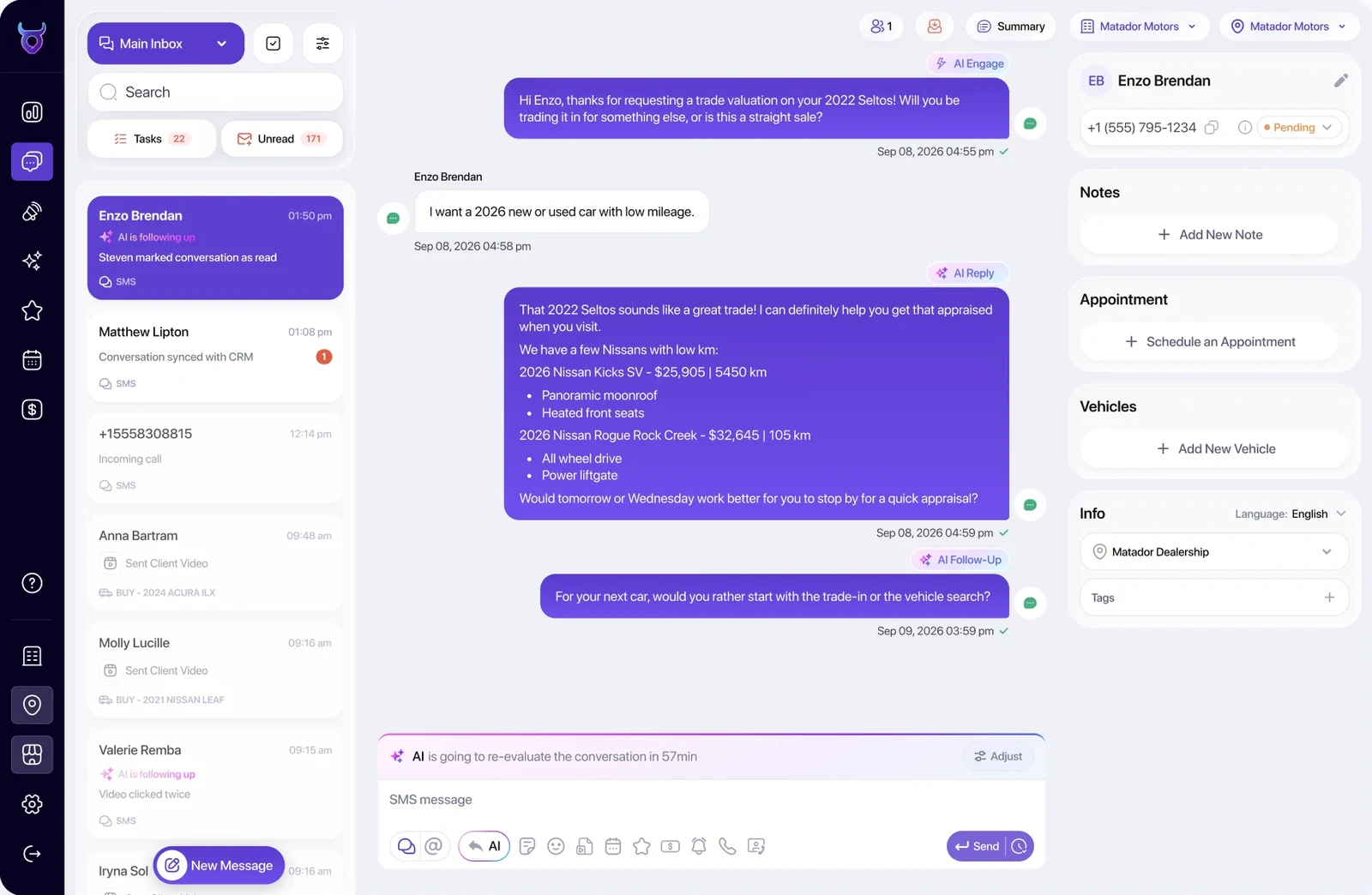
What changed at one store that added AI to its CRM?
Tabangi Motors added Matador to Activix CRM and reported a 200% increase in showroom visits and a 40% increase in total lead volume. Read the case study.
How Are Car Dealerships Using AI Chatbots With Their CRM?
In four jobs: website chat, lead-response texting, follow-up and voice. “Chatbot” covers four jobs, and a demo usually shows one. Ask of each: where it lives, what it does, and what it leaves on the CRM record.
| Kind | Where does it live? | What does it do? | What does it write to the CRM? | Which Matador agent? |
|---|---|---|---|---|
| Website chat | On the dealership website, every page. | Answers pricing and availability from live inventory, captures the lead inside the conversation, offers the appointment. | The new lead, the transcript, the appointment. | Chat AI |
| Lead-response texting | On every lead the CRM receives, from any source. | Opens the lead in about 30 seconds with a message shaped by its source and intent, then runs the conversation on real-time inventory and books. | Every message, attributed to the AI, plus the appointment. | AI Engage + AI Reply |
| Follow-up automation | On the leads that went quiet. | Decides who to re-engage, when, and with what reason to return; works stalled leads for up to 180 days. | Each touch and each reply, so the record shows the whole thread. | AI Follow-Up |
| Voice AI | On the sales and service phone lines. | Answers as receptionist, sales line and service scheduler; books service appointments straight into Xtime. | The call outcome and the appointment, in the same customer thread as the texts. | Call AI |
Which kind should a store without a BDC add first?
The one that covers the step the floor keeps dropping. At the store where Aaron Van Voorhees is general sales manager, salespeople do their own follow-up, and first contact slipped on busy days. So the store added a named texting assistant that makes first contact on every new lead and hands the shopper to the salesperson once they engage. The name matters; see whether customers mind talking to an AI.
What should the AI do when a salesperson steps in?
Stop. Sean V. Bradley, a dealership process trainer, makes that his first fix in any store: the automated cadence switches off the moment a rep has a conversation, or the shopper gets a template in the middle of a real one. Ask to see the hand-off in the demo, then ask what the AI sends after it.
Is there a fifth kind?
Yes, and it is not a chatbot. A browser extension that puts the conversation inside the CRM screen, with the history loaded and a message button on every record, is what makes the other four usable by a team that lives in the CRM. Treat it as a requirement, not an extra. How it works is below.
How Does an AI Chatbot Connect to a Dealership CRM?
At one of three depths, and most vendors mean the shallowest. “Integrates with your CRM” usually means a lead pushed one way. The depth decides whether your CRM record tells the truth about the customer.
Lead-only push
The chatbot captures a lead and sends it to the CRM as a new record, usually in the standard ADF/XML format every lead provider uses. Nothing comes back.
Ask the vendorAfter the lead is created, does the CRM ever hear from the chatbot again?
Two-way sync
Conversations, appointments and lead ownership move in both directions. The CRM record shows every message the AI sent and received; a change on either side updates the other.
Ask the vendorWhich objects sync: messages, appointments, assignment, opt-outs? How often? In which direction?
Inside the CRM
The conversation is reachable from the CRM screen itself: a message button on every record, the full history loaded, so the team never leaves the tool it lives in.
Ask the vendorCan a salesperson open the thread from the CRM record without retyping anything?
What if the chat never captures a phone number?
Then it is depth zero: a conversation, but no lead. Sam Maimone, a CRM specialist who has worked on the dealership, vendor and manufacturer sides, questions how often such chats convert at all. Ask the vendor to show a finished chat and then the CRM record it produced.
How do the depths map to the platforms above?
The certified partner CRMs take every lead in and open the conversation inside the record through the extension. The two-way sync CRMs add the write-back of messages, appointments and assignment. The DMS platforms are a different connection: service data from the system that writes the repair order. The what-syncs table shows it row by row.
Can the AI Work Inside the CRM Screen Your Team Already Uses?
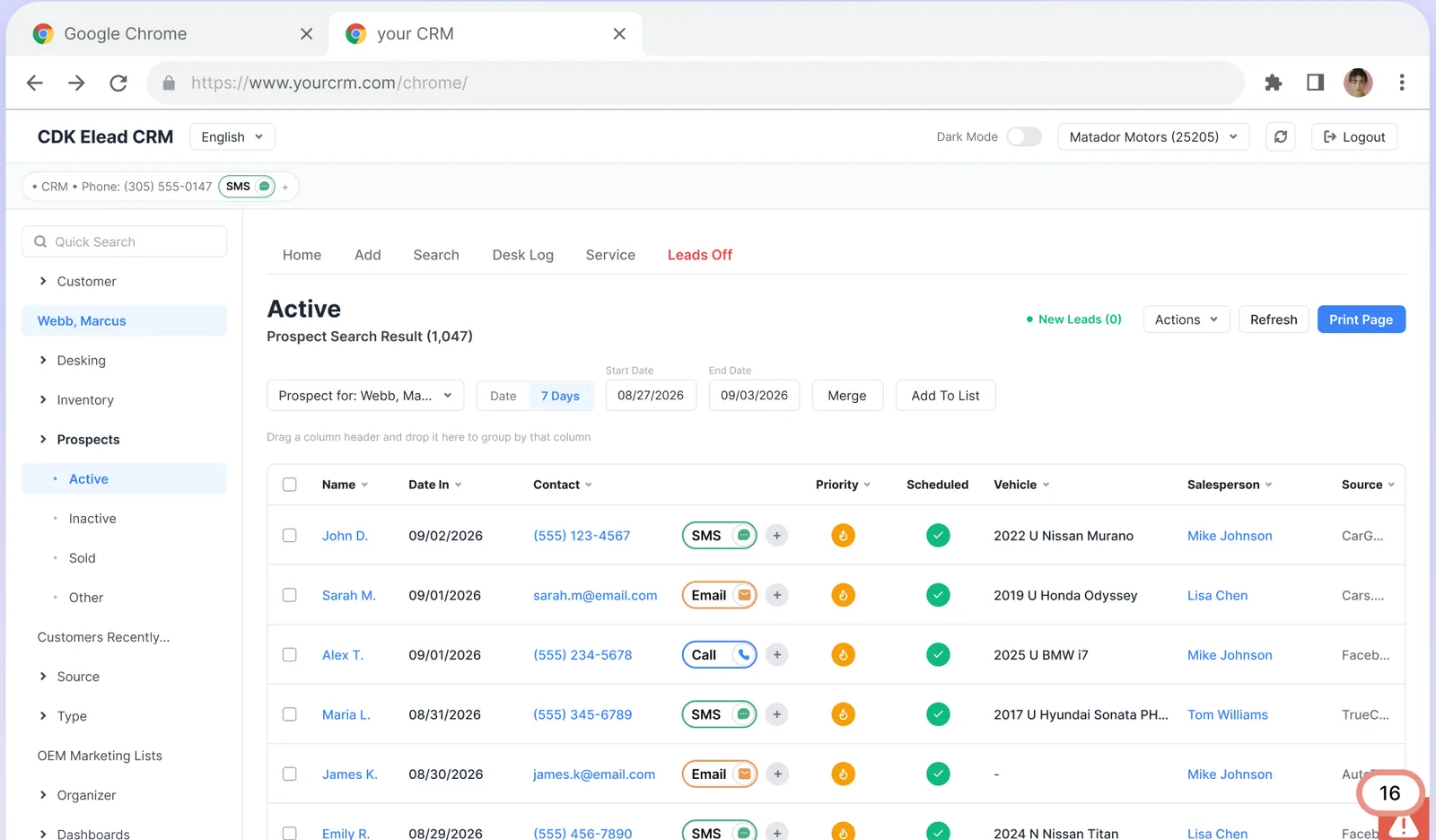
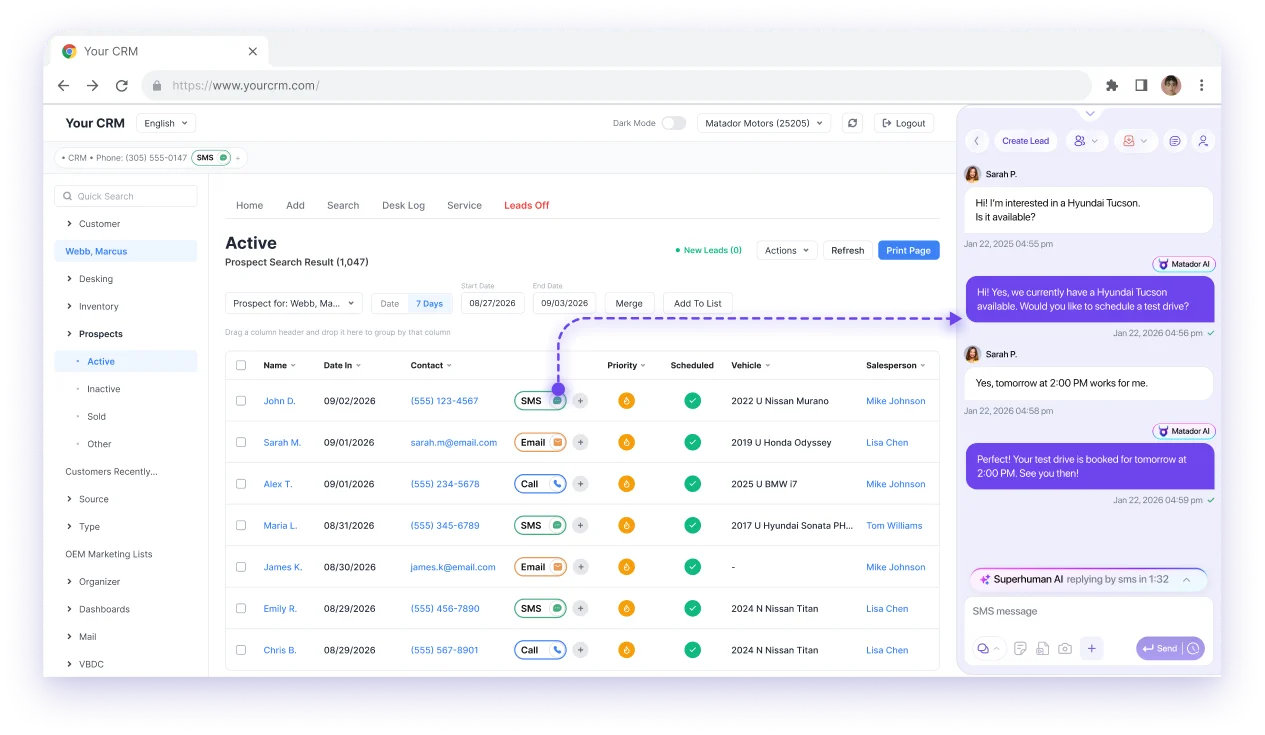
Yes, through a browser extension, in three steps. It puts a message button on every record and opens the Matador conversation with its full history loaded, so nothing is retyped.
Install the extension
Chrome, Edge or Firefox, from the browser’s own store. No IT ticket, about thirty seconds to set up, sign in once with your Matador account.
Click the message button on any record
An SMS, Email or Call button appears on every customer row and record, in VinSolutions, eLead, DealerSocket, Tekion, or any tool that runs in a browser.
The conversation opens with its history
The Matador widget slides in with every previous message, templates and scheduling. Whatever you send shows up in Matador, on the desktop and in the mobile apps.
 Chrome
 Edge
Edge Firefox
What Syncs Between the AI and the CRM, and in Which Direction?
It depends on the platform group, so ask for this table on your CRM. A connection that only drops a lead in is very different from one that keeps appointments, conversations and assignment in step.
| Does it sync? | Certified partner CRMseLead · VinSolutions · DealerSocket · Xtime | Two-way sync CRMsActivix · DealerCX · DealerPeak · TMS | DMS platformsTekion · Reynolds · CDK · Dealertrack · PBS · Titan |
|---|---|---|---|
| Leads into Matador | YesEvery lead provider into one inbox | YesLeads imported (DealerCX, TMS); lead data on all four | –Not part of it |
| Texts and emails written back to the record | ?AskFull history lives in Matador and in the extension | YesActivix, DealerCX, DealerPeak, TMS | –Not part of it |
| Appointments pushed, pulled and updated | ?AskXtime: Call AI books service appointments | YesActivix, DealerCX, TMS (DealerPeak: not listed) | YesService appointments read from the DMS |
| User assignment kept in step | ?Ask | YesAll four | –Not part of it |
| Opt-outs | ?AskRecorded in Matador | YesPushed to Activix, one direction | –Not part of it |
| Repair orders and live RO status | –Not part of it | –Not part of it | YesAll six, as the RO is written |
| Automations from service history | –Not part of it | YesOff historical Activix data | YesLive and historical |
| Inventory | –Not part of itComes from your inventory feed | ?AskTier 2 feed via Affinitiv (DealerCX) | ?AskTier 2 feed over the PBS API |
| Jump from Matador to the CRM record | –Not part of it | YesActivix, DealerPeak, TMS | –Not part of it |
| Text from inside the CRM (extension) | YesThe Matador logo on any record | Yes | YesAny tool that runs in a browser |
| Manage the AI from inside the CRM | –Not part of it | YesActivix, DealerCX | –Not part of it |
Is a lead-only connection a sync?
No. Before you sign, ask every vendor, us included, for this table on your CRM: which objects move, in which direction, how often, and at what cost. The checklist has a line for each.
What Should You Require From
a Dealership CRM Chatbot?
Ten lines, scored 0 to 2 on what the demo showed, not what the rep described. They apply to Matador as much as to anyone, and they score the same way the checklist scores the CRM.
Which AI is best for a car dealership?
The one that passes these ten lines on your own leads, inside your own CRM. This guide does not rank vendors; it gives you the test. Replay real leads from your store in every demo, ours included, and score what you see.
- Answers from live inventory. Availability, trim, mileage and price come from the feed, not a script, and the bot says so when it does not know.
- Your pricing rules, not the vendor’s. Share a range, route to a salesperson or book the appointment for the numbers: the dealership decides per store.
- A human can take over mid-thread. Without the customer noticing a seam, and without the AI texting over the top of the salesperson.
- One thread per customer, across channels. Web chat, text, email and the phone call land in the same conversation, so nobody asks a question the customer already answered.
- Every message written back, attributed. The CRM record shows who said what and when, person or AI, so a manager can audit it.
- Consent and opt-outs honored everywhere. A STOP reaches every connected system (TCPA in the US, CASL in Canada), and consent status is visible beside the conversation.
- Books into the calendar you actually use. The CRM’s appointments, or the service scheduler, not a calendar nobody at the store opens.
- Reports appointments influenced, not messages sent. Per agent and per rooftop, with the show rate, because volume of texts is not a result.
- Works inside the CRM your team lives in. A button on the record beats a second tab the team has to remember to check.
- Proves it on your leads before you sign. Replay real leads from your store in the demo; a prepared script shows ideal conditions, your leads show the store.
Should you score the AI with the CRM or after it?
With it. The scored checklist has a section for integration and API access and one for lead reading and customer intelligence; the AI belongs in both. Price it as a line in the first-year total, with texting and integration fees beside it.
How do you judge an AI pilot?
Set its length and its number before it starts, such as contact rate on new leads or engaged shoppers handed to a salesperson. Van Voorhees, a couple of months into his store’s texting pilot without strong results yet, treated that as early rather than as failure. Without a set end and number, a pilot ends when someone gets impatient.
Where do dealership chatbots go wrong?
Most of the bad reputation was earned honestly, by website widgets that could not answer a question or write anything down. Here is the line between that and 2027.
Scripted, siloed, and silent in the CRM?
- –A decision tree: three buttons, then “a representative will contact you shortly.”
- –No write-back: the conversation lives on the vendor’s dashboard, and the CRM record stays empty.
- –It asks for the name, phone and vehicle the CRM already has.
- –Follow-up that says “just checking in,” on a schedule, with nothing new to offer.
- –It texts before consent is recorded, or keeps texting after a STOP that only one system heard.
- –Reports count messages sent; nobody can say how many appointments it set or how many showed.
Conversational, connected, and on the record?
- +It reads the lead and replies to what the customer actually asked, from live inventory.
- +Every exchange is on the CRM record, attributed to the AI, with the appointment synced.
- +It knows the customer’s history, journey stage and consent status before it types.
- +Follow-up carries a reason to return: a new arrival, a price drop, a trade value, a service due.
- +Consent is captured and STOP is honored across every connected system.
- +Reporting is in appointments influenced, per agent and per rooftop, with the show rate beside it.
Every line on the right is on the list above. If a demo cannot show it on your leads, it is not there.
What happens when a shopper’s AI talks to yours?
It can run on, at a cost with every message. The hosts of a dealer podcast who sell AI tools describe a shopper’s assistant answering a dealership’s assistant for fifteen or twenty minutes. Require a cap on conversation length, an alert when a thread runs long, and a report that puts cost per conversation beside appointments influenced.
Matador, your CRM and AI chatbots, answered
Is Matador a CRM?
Do I have to switch CRMs to use Matador?
Which automotive CRMs does Matador integrate with?
What does two-way sync actually mean?
Does the chatbot write the conversation back to the CRM?
Does the browser extension work with my CRM?
Is an AI chatbot the same thing as a dealership CRM?
Can the AI book appointments, or only hand off to a person?
What happens when a salesperson wants to take over the conversation?
Where does the AI get its answers about inventory and pricing?
How does a dealership chatbot handle texting consent and opt-outs?
Do customers mind talking to an AI chatbot at a dealership?
How do I evaluate a dealership CRM and its AI together?
The rest of the Automotive CRM Guide
The Automotive CRM Guide for Dealers
The short version of the whole decision: what a dealership CRM must do, how to score one, what running it well looks like, and when to add AI instead.
Open the guide →The checklistThe Auto Dealer CRM Checklist: Score Any CRM Before You Sign
Eight requirements with a demo test for each, weighted for your type of dealership, and the first-year price sheet. Free PDF.
Read →Best practicesAutomotive Lead Management: How the Best-Run Stores Do It
The processes and daily habits the people who train dealerships on their CRM teach, drawn as diagrams you can hold your store against.
Read →Buyer’s guideAI for Automotive Dealerships: The Practical Guide
Use cases by department, the questions to ask vendors, what implementation involves, and how to read the ROI.
Read →Industry mapAI in the Automotive Industry in 2027
From design and the factory floor to the car, the supply chain and the dealership: where AI is at work, and where it is not yet.
Read →Keep Your CRM.
Add the Team That Works It.
Twenty minutes with our team. We connect to the CRM you have, replay real leads from your store, and show you the appointments sitting in them right now.